In 2006 and 2007 I bought five LaCie external disc drives, mostly the d2 or d2 Quandra models with a capacity of 500GB. I also bought two LaCie Mini 500GB drives, the kind that match a mac mini and sit neatly underneath it.
LaCie Mini Hard Drive
LaCie d2
In 2008 the power supplies started failing. The light would flash but the drive wouldn’t mount. With more than one drive I was quickly able to swap power bricks and confirm the problem. LaCie, to their credit, replaced each power supply without complaint, although on one occasion it took a while as they were out of stock. This happened four times with the d2 drives.
Last week it happened again. This time I ordered a drobo, ripped out the drives from the LaCie d2s and installed them in the drobo. As soon as I got that up and running one of the LaCie mac mini power supplies drives failed! Luckily I’ve now got a large stock of power supplies so I’ve just swapped it over.
Six power supply failures out of seven drives. Not good.
Pittsburgh, PA’s 33-story Grant Building famously spells out the name of the city in Morse Code so brightly it can be seen for over 100 miles. Except it doesn’t actually spell Pittsburgh, but “Pitetsbkrrh.” Eep.
A former HAM radio enthusiast and Pittsburgh local, Tom Stapleton, decoded the message and posted the gaffe on YouTube, and it clearly shows the tower’s misspelling. He said he noticed the problem when he casually looked up and saw the signal broadcasting the letter K, which he remembered well as it’s the first letter of his sister’s name. Too bad “Pittsburgh” doesn’t contain the letter K. Representatives of the tower’s owners could not say how long the tower had been advertising Pitetsbkrrh. [Pittsburgh Post-Gazette]
So you bought the original iPhone when it was released in November 2006 and upgraded it to the 3G in July 2007 on an 18 month contract. Now you want to upgrade to the new iPhone 3G S on the 19th of June.
iPhone 3G S (32GB)
The problem – you’ve got six months left on your contract and O2 are going to charge you 6x £35 = £210 to get out of the contract, then £274.23 for the new 32GB iPhone and a new 18 month contract. Grand total £484.23.
A better way is to buy the new Pay & Go iPhone at £528.30, swop your old sim card into it, and sell your old 16B iPhone to MazumaMobile for £200. Grand total £338.30. A saving of £145.93.
As pointed out in this thread on Macworld UK, you’ll be able to continue your old contract until July 2010 and then be able to upgrade to the inevitable next iPhone release. O2 have confirmed to a couple of customers that your current sim card will work in a new Pay & Go iPhone.
Anything wrong with this logic?
[Update] Apparently not, as O2 confirm at the bottom of this page that your current sim card will work in a new Pay & Go iPhone.
[Update 2] Apparently yes. @rickythegeek (thanks Ricky) points out on twitter that you can sell the old iPhone to MazumaMobile whichever route you take. That brings down the price of paying off your old contract and taking out a new one to £284.23, the better deal by £54.
On further reflection I think I’ll stick with Plan A and buy a Pay & Go iPhone and continue the old contract. Although it will be £54 more expensive the contract will have expired by July 2010 making the next upgrade cheaper and easier.
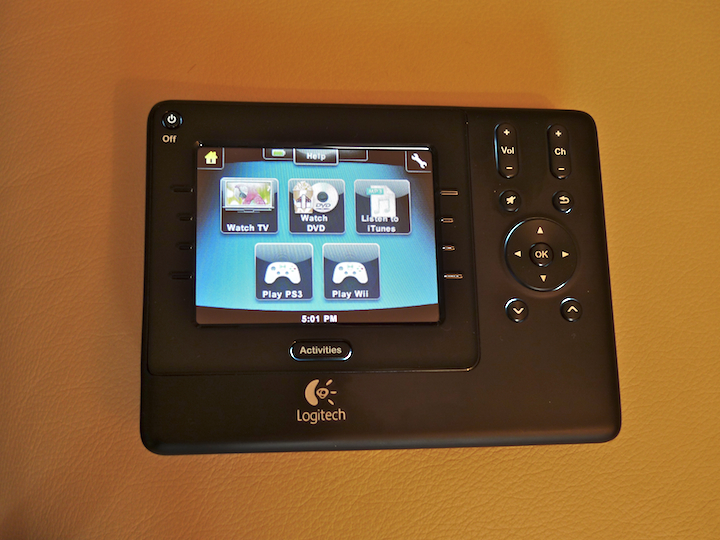
I recently picked up the new Harmony 1100 Universal Remote to replace my very tired Philips Pronto RU890. The Pronto is very powerful but took weeks to program satisfactorily and I dreaded having to reprogram it if I found an error in a sequence of IR codes or I replaced a home entertainment component. Part of the dread was due to the Windows only software and part to the old serial port which required something like a Keyspan USB-Serial adaptor to connect with – the whole process was hit and miss…
I’m really enjoying my Sony Reader PRS-505. I got hold of it before Christmas with the aim of lightening my travel load, and it works a treat.
The screen is very clear – when I saw it on display in Waterstones I thought it was a mock-up with a piece of paper slapped over it. There’s no backlighting on the screen but you can always clip one of those little reading lights on the cover when you want to read in the dark.
Sony Reader PRS-505
The battery life is excellent because it only uses power when you turn the page. I ran it recently for seven days, using it everyday, and the battery indicator was still showing full when I got around to plugging it in. I’ve never seen it showing less than half charge.
Sony’s partner in the UK is Waterstones. Last time I looked they only had about 7,500 ebooks available and their prices aren’t low either. The good news is many ebooks can be downloaded free of charge, in fact the Reader includes a CD with 100 out-of-copyright classics to get you started. And the Gutenberg Project has thousands of free titles to download.
For purchased books I’ve been using mainly ebooks.com and Powells. Ebooks are available in a variety of formats, DRM’ed and DRM-free, and tools are available online to convert to and from various formats.
Sony Reader PRS-505
As a Mac user there is one ripple on the pond. Sony uses Adobe Digital Editions to authorise the Reader to display DRM-protected files and the Mac version of ADE doesn’t recognise the Reader. The solution is to authorise the Reader from the Windows version of ADE, either with a real PC or something like Parallels. Once the Reader has been authorised you can use the Mac version of ADE to put files on the Reader, or simply drag them to the Reader which shows up as a USB drive in the Finder.
An even better solution is Calibre by Kovid Goyal. Calibre (freeware) converts ebook formats, sends the files to the Reader, allows you to read the ebooks on your Mac as well, if you wish, and generally manages your ebook library.
Sony has recently released the PRS-700 with built-in backlighting, a touchscreen and a higher price, but it’s getting mixed reviews. The 700 isn’t designed to replace the 505 apparently, and both are likely to be on sale for the foreseeable future, but the PRS-505, at US$300/UK£200, is significantly cheaper and does the job well. Recommended.